
Your whole business.
Full stop.
Your digital headquarters.
Customers, projects, people and money in one place, with the intelligence to tell you what needs attention next. Built for installers, contractors and field service firms.
Built inside a working UK installer. It runs their sales, projects, site teams, fleet and finance every day.
Five pillars. One headquarters.
Everything a growing business runs on sits in one of five pillars, and they all share the same jobs, people and figures. No copying between systems, no gaps between them.
Every enquiry to a signed order, in one place.
Leads come in from your website or a link the customer fills in, land on a sales board with their value and next step, and move through to a quote they can sign.
- Enquiries from your website, or a form the customer fills in themselves
- Sales boards with each job's value, next task and who has it
- Price book, versioned quotes and branded proposals
- Contracts and letters of intent signed online
- Customer emails from your own mailboxes, replies matched to the job
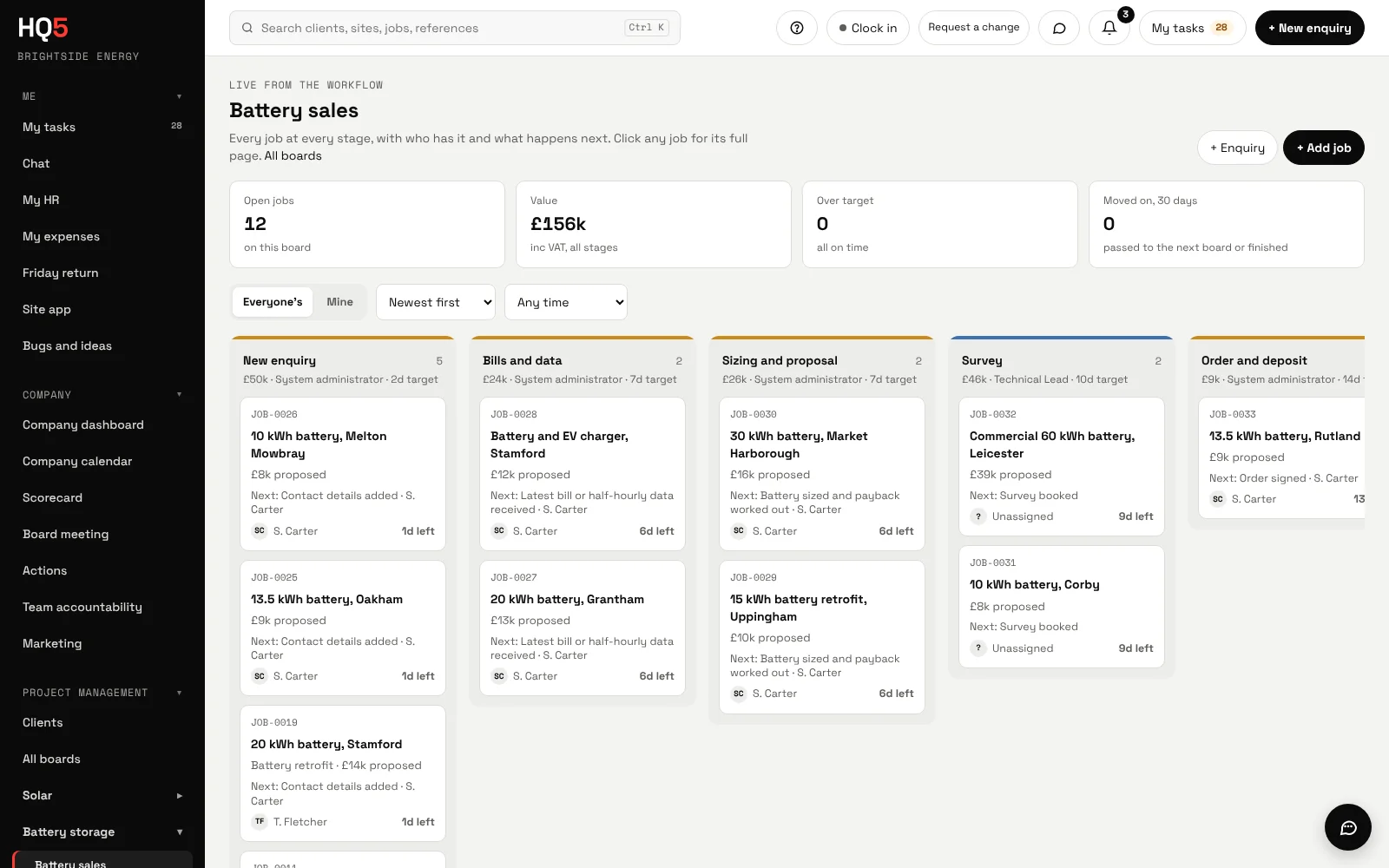
Every enquiry is a card on the sales board, sitting in the column for its stage with its value, its next step and who has it. This is the Customers pillar day to day: the whole pipeline at a glance, and nothing waiting on someone remembering it.
Example data from a demo company.
One page for every job. Finishing a task passes it on.
Your own boards, stages and checklists, with every item owned by a role. Tick yours and the job lands with whoever does the next part, history and files attached.
- Boards, stages and checklists built your way
- Schedule and planner: who's on which job, every day
- A site app that works with no signal: RAMS, photos, forms, issues
- Purchase orders, goods in and stock against each job
- Paperwork that fills itself from the job
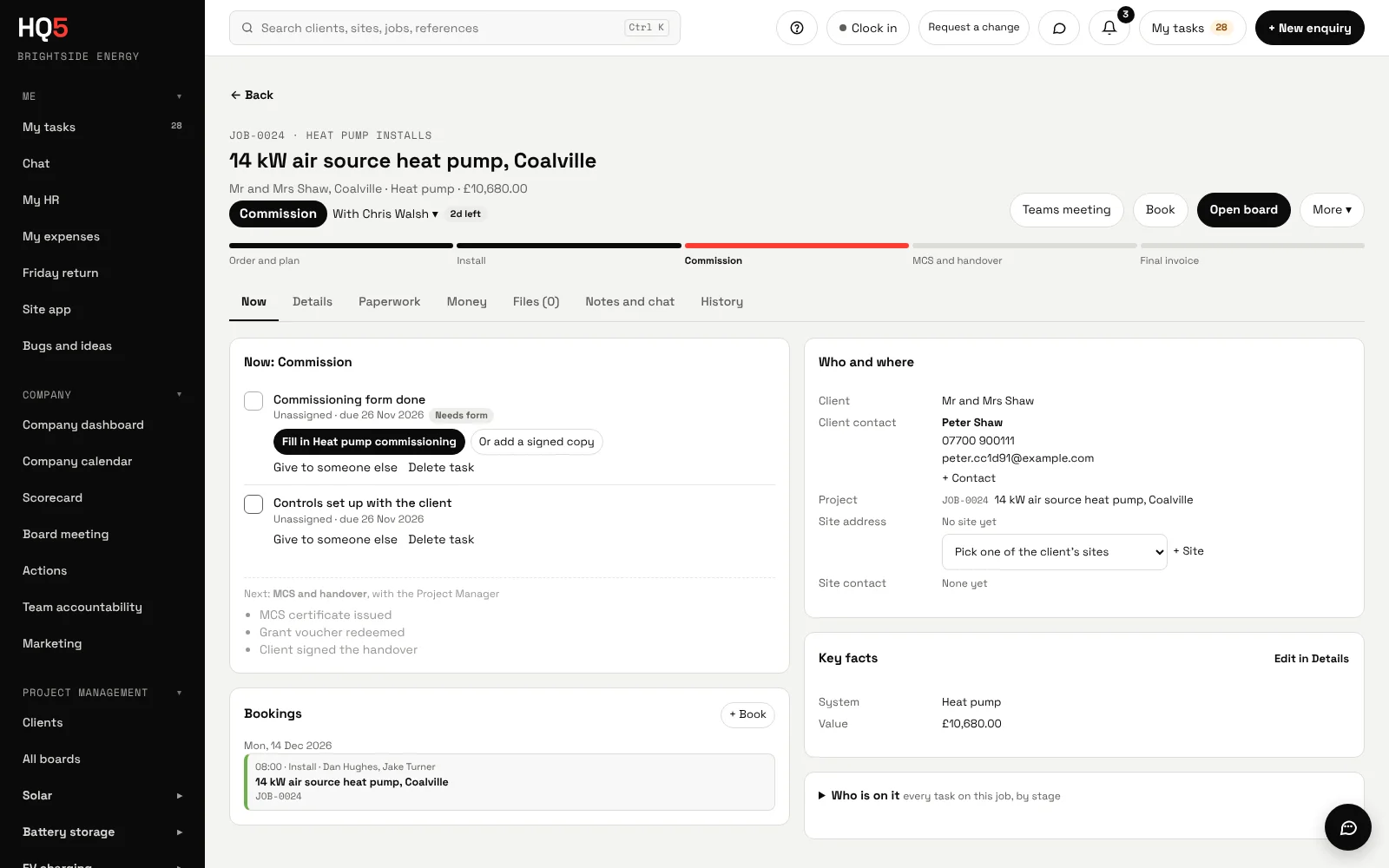
Once it’s sold, the job page is the project’s home: the stage bar across the top, today’s checklist, the bookings and the client. Tick the last task at a stage and the job moves to the next team on its own.
Example data from a demo company.
Who's where, what they're cleared for, what they've worked.
Your org chart sets who sees and does what. Clocking fills the timesheet, the planner shows who's free, and certificates, vans and kit are tracked against the people who hold them.
- Org chart, roles and permissions
- Holidays, sickness and documents to read and sign
- Clocking in on the phone fills timesheets, overtime worked out
- Fleet: vans, drivers, weekly checks, trackers and fuel cards
- Health and safety: certificates with expiry dates, RAMS approved before site
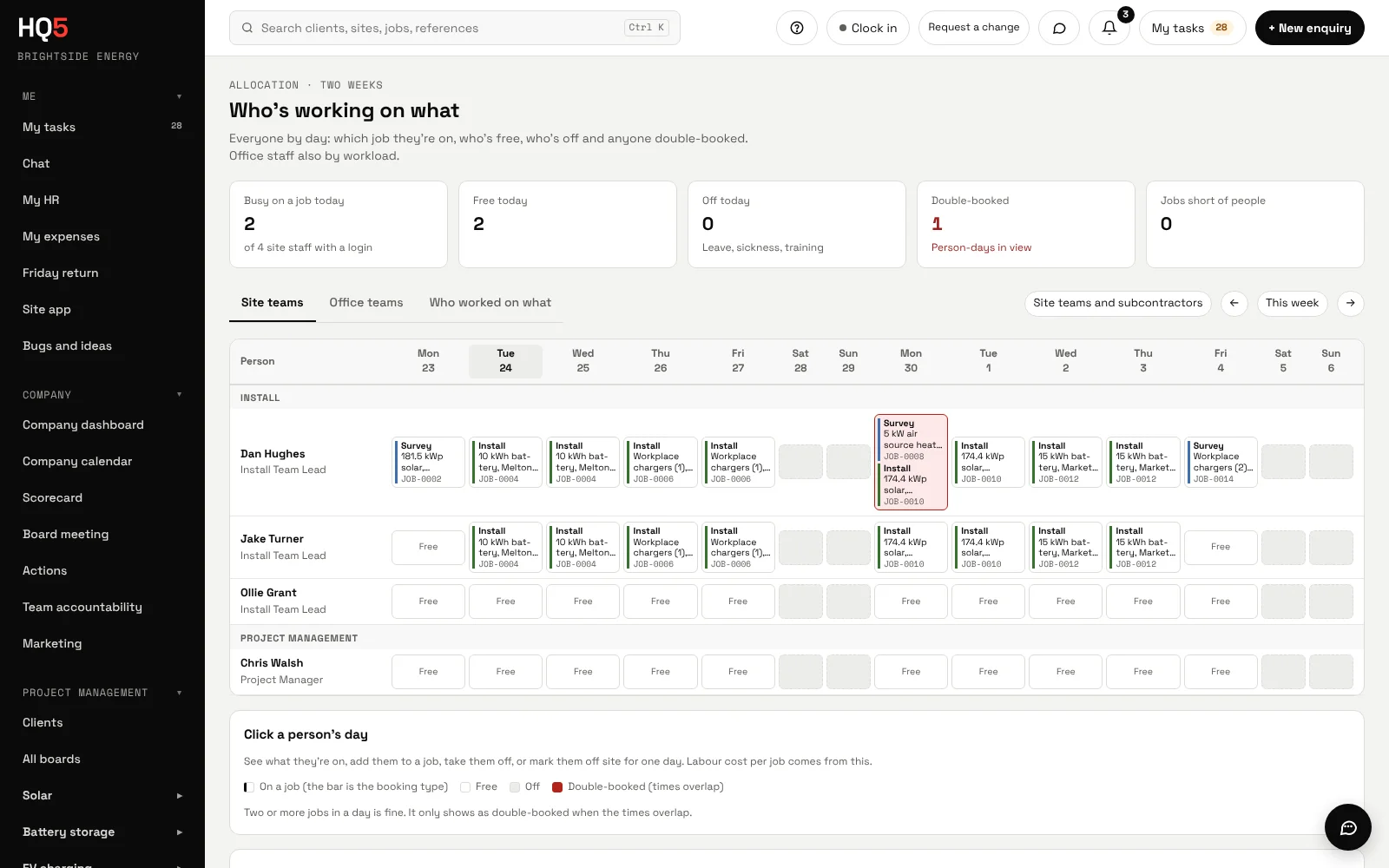
Every person and team by day: which job they’re on, who’s free, who’s off and who’s double-booked. Holidays, certificates and clocking all feed it, and labour cost follows each person to the job.
Example data from a demo company.
Invoice the day the work's done. Know what each job made.
Payment stages come from the accepted quote and go to Xero as drafts. Labour, orders, expenses and working away land against the job, so margin is a fact, not a guess.
- Stage invoices raised from the accepted quote, straight into Xero
- Supplier invoices matched to purchase orders
- Real margin on every job: labour, materials, expenses
- Forecast, cash flow and management reports
- Month-end journals worked out for you
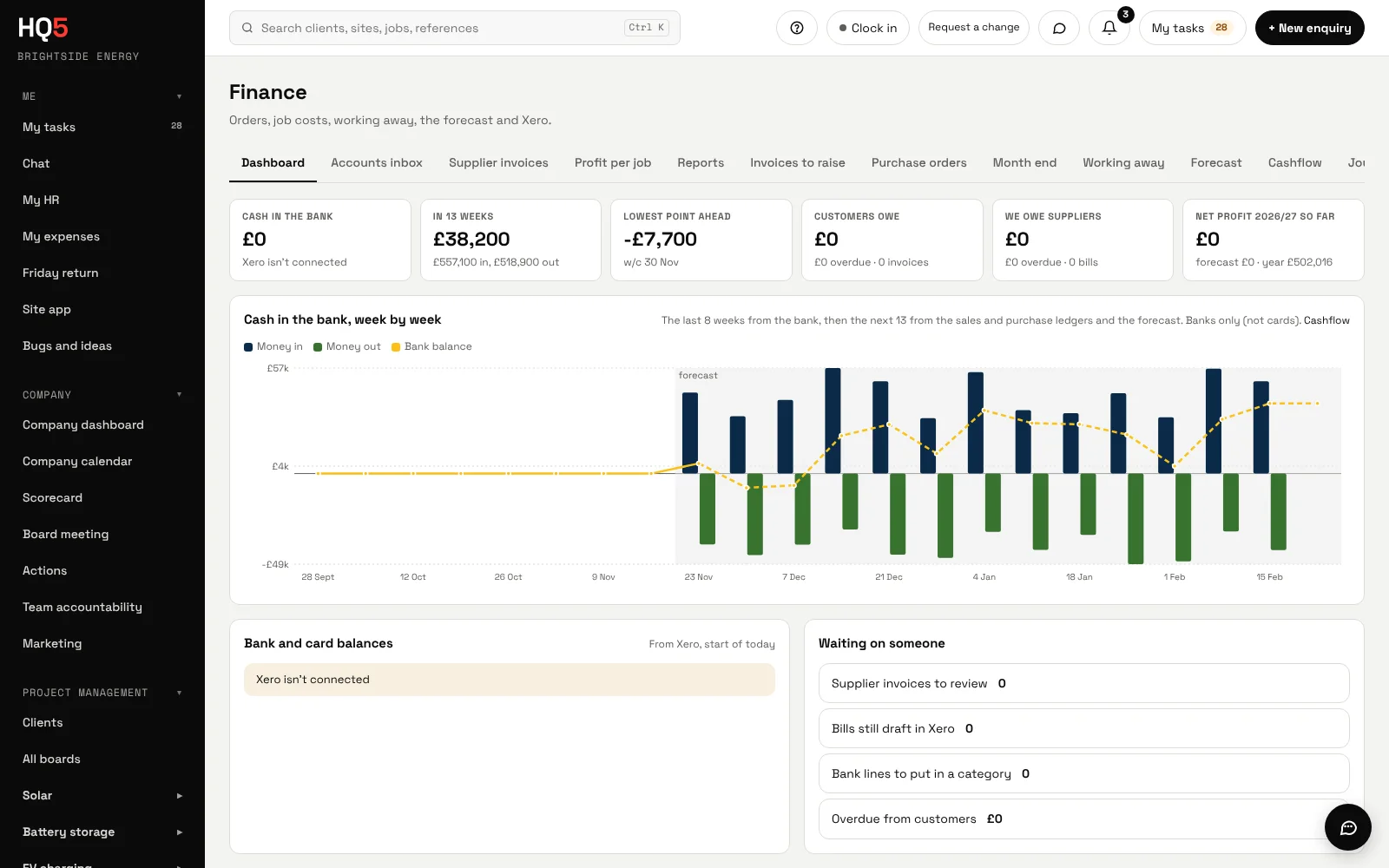
Cash in the bank, the next 13 weeks from your ledgers and forecast, what customers owe and what’s waiting on someone. Connect Xero and the actuals keep themselves up to date.
Example data from a demo company.
It tells you what needs attention next.
Checklists tick themselves when the work's done, reminders chase for you, and everyone starts the day with a list of what's theirs. Ask HQ5 a question and get the answer from your own figures.
- My tasks: what's due, what's late and what needs you
- Checklists that tick themselves from what's on the job
- Alerts for overdue jobs, expiring certificates and stuck work
- Ask HQ5: answers from your figures, never your customers' details
- A weekly scorecard that keeps the Monday meeting short
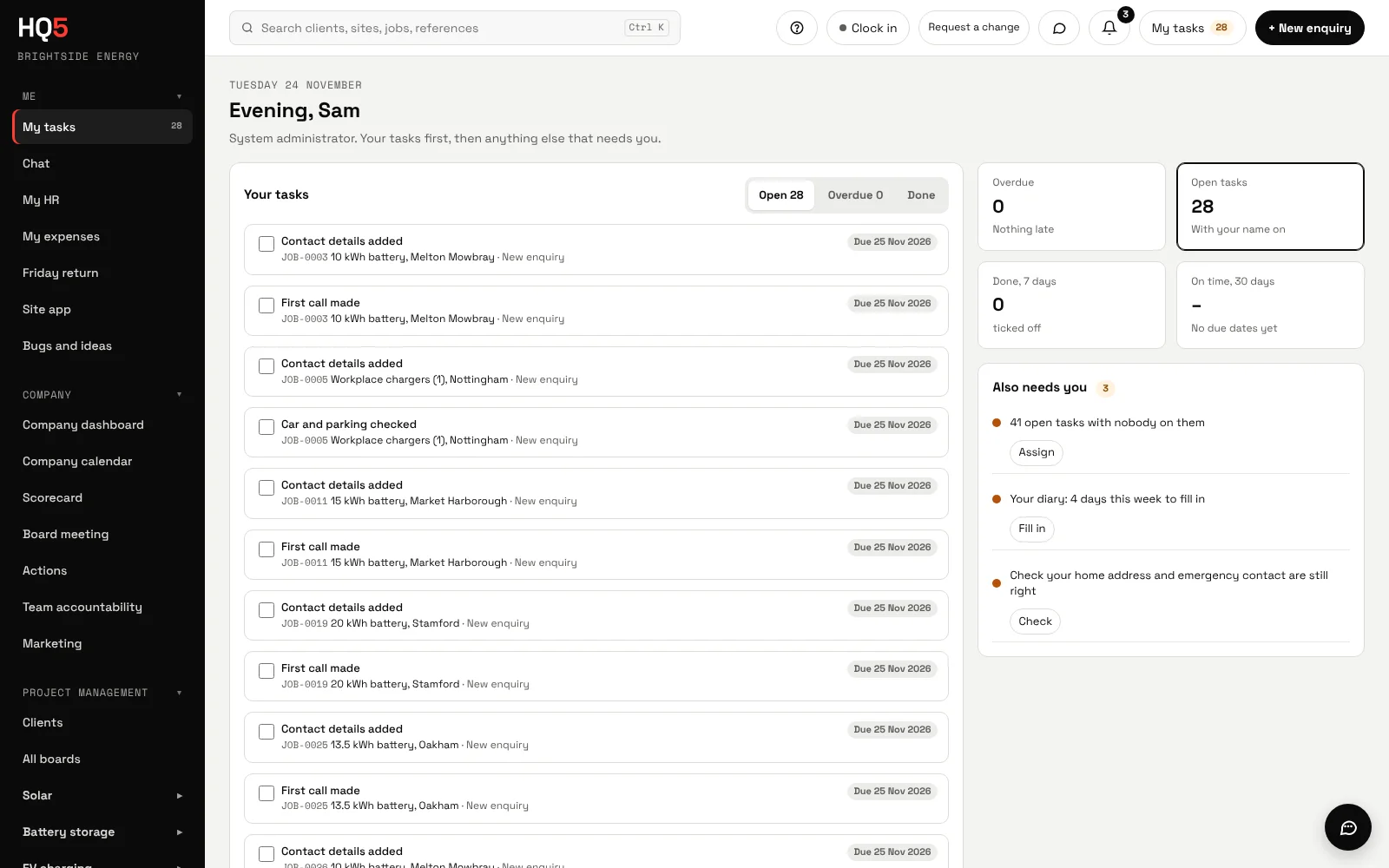
Each person starts the day here: their tasks, what’s late and what else needs them, pulled from every pillar. HQ5 works out what needs attention next, so nobody has to go looking.
Example data from a demo company.
Work goes wrong at the hand-off. HQ5 owns every one.
Most firms lose time between people, not inside a task: the survey's done but design doesn't know, the job's fitted but nobody's raised the invoice.
Every task has an owner
Each stage of a job has its checklist, and every item belongs to a role on your org chart. No orphaned jobs, no "I thought you had it".
Ticking it passes the job on
When someone finishes their part, the job lands with whoever does the next one, with the history and files attached. Time stamped and on their record.
You see where it's stuck
Boards, timelines and a weekly scorecard show what's late and who has it, so the Monday meeting is about decisions, not chasing.
What changes when you run on HQ5.
Nothing falls between people
Every task has an owner and finishing it hands the job on, so work stops waiting on someone remembering to pass it along.
One login instead of a stack of tools
Jobs, schedule, site app, HR, fleet and money in one place, so you stop paying for, and copying between, separate systems.
The office and site see the same job
Photos, test results, sign-offs and issues land on the job the moment they're taken, even from a roof with no signal.
Invoice the day the work's done
Payment stages come from the accepted quote and are raised as each stage finishes, so cash isn't stuck behind paperwork.
Know what each job really made
Labour from the schedule, purchase orders, expenses and working away all land against the job, so margin is a fact, not a guess.
Up and running in days
Your industry pack brings the boards, checklists and forms. Import your clients and live jobs from a spreadsheet and your team can start.
Starts set up for how your industry works.
Pick your industry and HQ5 arrives with the boards, checklists, forms and words you'd use. Do more than one thing? Pick more than one.
Solar and batteries
Where HQ5 started.
- Proposals with savings and payback
- Roof design and stringing
- DNO applications and chasing
- Commissioning and handover packs
Heat pumps and EV charging
Survey to commissioning, grants to handover.
- Heat loss surveys on site
- Charger install and test records
- Grid notifications
- Service plans after install
Construction
Tender to practical completion.
- Tender and contract boards
- Daily site diaries and snagging
- Subcontractors and their insurances
- Working away and accommodation
Trades and field services
Electrical, plumbing, HVAC, fire and security.
- Jobs and service visits
- Test certificates and service records
- Vans, stock and timesheets
- Planned maintenance contracts
Property and maintenance
Lettings, inspections and repairs.
- Property inspections on a phone
- Reactive and planned maintenance
- Contractor booking
Sales teams
Deals, not jobs.
- Pipelines and accounts
- Onboarding and renewals
- Weekly numbers against target
Core, then add what your business needs.
Pick the plan that fits your team. Every plan includes one industry pack, unlimited jobs and the site app for everyone on it.
Founding customers: half price for your first 12 months. Open to the first 10 firms, in return for a case study and a reference call.
Get the work organised
£349 a month
Up to 10 users · 1 industry pack
- Boards, stages and tasks set up your way, with the hand-off chain
- Clients, sites, quotes and the price book
- Schedule, planner and calendars
- Site app, forms, photos and sign-offs
- Purchase orders, stage invoices and expenses
- HR, leave, certificates and timesheets
- Org chart, roles and permissions
- Fleet register, van checks and health and safety
- Chat, plus Outlook and Teams when you connect Microsoft 365
Run the work and the books
£999 a month
Up to 25 users · 1 industry pack · Xero included
- Everything in Starter
- The Xero link: invoices, bills, payments and job costs both ways
- Add any bolt-on at £149 a month
Every bolt-on, for a bigger team
£1,799 a month
Up to 50 users · 1 industry pack · all bolt-ons
- Everything in Core
- Cash flow, forecast and management reports
- Stock in the yard and on the vans
- Vehicle trackers and fuel cards
- The AI assistant
Groups and larger firms
On quote
More than 50 users · several companies
- Everything in Pro
- Payroll reports and journals
- Several trading companies with intercompany
- Help moving your data across
Extra industry packs are £99 a month each. Bolt-ons on Starter or Core are £149 a month each. Pay annually and get two months free. Prices are per company, per month, plus VAT.
Not included: the apps you connect
Your plan pays for HQ5. Integrations let you plug in other apps, like Xero, Microsoft 365, an AI provider, Google Maps, vehicle trackers and fuel cards, so HQ5 can do more with them. Those apps aren't part of any plan: you sign up to them yourself and pay them directly, on your own account. A bolt-on like the Xero link or the AI assistant is the HQ5 side of the connection, not the app itself. See what connects and who bills it.
Your accounts keep up with the jobs, without the typing.
HQ5 and Xero talk both ways, so the office stops keying the same invoice, bill and payment into two systems.
- Invoices go straight in. Approve a stage invoice in HQ5 and it lands in Xero as a draft, against the right job.
- Supplier bills fill themselves in. Invoices emailed to your accounts inbox are read, matched to the purchase order and goods received, and drafted as Xero bills with the PDF attached.
- Every job is a project in Xero. Costs and sales are tracked by job, so profit per job matches your accounts.
- Payments and bank lines come back. See what's paid, what's overdue and plan supplier payment dates.
- Cash flow from real numbers. Bank balances and transactions feed a week-by-week cash forecast.
- Journals without spreadsheets. Labour, working away, stock and payroll journals are sent to Xero as drafts for your accountant to check.
Work out your price
HQ5 was built inside a UK solar and battery installer to replace the job management software they'd outgrown.
Every page was shaped by the people who use it: sales, design, project managers, installers on site, finance and the directors. It runs their whole business today.
Your data is safe, and it stays in the UK.
Jobs, customers, money and HR records are the most sensitive things a business holds. HQ5 is built to keep them that way.
Verified logins only
Nobody gets in without an invitation to a work email address they've confirmed. Leavers are switched off in one click.
Two-factor sign-in
An authenticator app code, or Face ID and fingerprint on phones. Require it for everyone with one switch.
Hosted in London
On Amazon Web Services in London, so your data stays in the UK. Encrypted in transit and at rest, backed up every night.
Your company only
Each company's data is kept apart and never shared. Keys for the apps you connect are stored encrypted and never shown again.
Everyone sees only their part
Roles and permissions decide every page and action. Payroll sits behind its own password and access list.
A record of everything
Every change, sign-off and sign-in is logged with who and when, in a log nobody can edit or delete.
See it with your own jobs.
Tell us a little about your business. We'll set you up a demo company with your industry's boards and example jobs, then walk you round it.
- Your own demo account to try for two weeks
- Set up with the industry packs and plan you pick
- No card details, no commitment